

Building a Personal OS with AI
A practical way to organize identity, family, work, projects, and decisions when your head has become the system

For years, I treated my ability to hold everything in my head as a strength.
It has been working well and still there are days when I wish having a personal assistant, who would remember everything.
A senior role asks you to carry strategy, ambiguity, politics, timing, people, money, and execution at the same time. Family adds another full operating layer. Children, schedules, emotional weather, practical logistics, money, health, school, aging parents, all of it sits in the same brain that is also expected to make clean decisions at work. If you are building something on the side, writing, learning, training, planning a career move, or trying to build a future in a new country, the load grows quietly until your head becomes the system.
That is where I found myself.
I am a senior commercial leader, a single mother of 3, and an amateur trail runner. I also have AI projects, writing projects, language goals, career decisions, family responsibilities, and a life I am still actively building. I stayed functional for a long time. I kept moving. I kept producing. I kept making decisions.
Functioning under load can look like clarity from the outside, and feel like pressure from the inside.
AI helped me see the difference.
I started using it for something more valuable than content generation. I used it to build a personal knowledge and decision system, a simple structure that helps me hold my life more clearly, think with less noise, and make better decisions when the pressure rises.

What this system is
A personal knowledge and decision system is a simple external structure for your life and thinking.
It gives you a place for:
who you are
what matters to you
how you make decisions
what responsibilities you carry
what projects are active
what is changing right now
which decisions are open
what has already been decided
A normal notes folder stores information.
A real system creates orientation.
It helps you answer better questions:
What am I carrying right now?
Which part belongs to work, which part belongs to family, and which part belongs to fear?
What decision am I actually trying to make?
Which principles apply here?
What changed this week?
What deserves my attention today, and what can wait?
When everything lives in one mental room, everything feels urgent. Your brain keeps revisiting the same topics because it does not trust that they are safely held anywhere else.
A good system creates trust.
It tells your brain that this thought, this obligation, this decision, this project, this concern, already has a place.
That is where peace starts.
Why AI helps
AI can write quickly, summarize fast, and give you a first draft when you need one.
But I think one of its most valuable uses is quieter.
AI can help you externalize the inside of your head.
It can listen to a messy brain dump, sort it into categories, separate facts from assumptions, identify open decisions, expose contradictions, and turn pressure into structure. It can help you maintain the system over time, especially when life gets busy and context disappears between one week and the next.
Used this way, AI becomes less like a machine for producing output, and more like a thinking partner with a very high tolerance for complexity.
The structure
The first version does not need to be complicated.
This is enough:
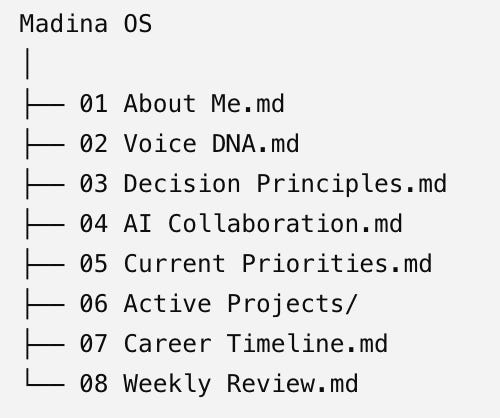
Each document has a distinct purpose:
About Me → stable background
Voice DNA → writing style
Decision Principles → how you make decisions
AI Collaboration → how assistants should work with you
Current Priorities → what’s changing this quarter
Weekly Review → progress and course corrections
That separation keeps long-lived guidance from becoming mixed with fast-changing information.
You do not need special software for this. A folder of Markdown files is enough. You can keep it in Google Drive, Dropbox, iCloud, Obsidian, Notion exported to Markdown, or a Git repository if you are comfortable with that. The file format matters less than the logic.
The advanced version could look like this:
personal-os/
├── README.md
├── 00_system/
│   ├── ai_operating_system.md
│   ├── principles.md
│   └── glossary.md
├── 01_identity/
│   ├── identity.md
│   ├── values.md
│   ├── strengths.md
│   └── timeline.md
├── 02_family/
│   ├── family_overview.md
│   ├── children.md
│   ├── responsibilities.md
│   └── family_rhythm.md
├── 03_voice/
│   └── voice.md
├── 04_knowledge/
│   ├── career.md
│   ├── education.md
│   ├── finances.md
│   ├── health_and_sport.md
│   └── languages.md
├── 05_projects/
│   ├── project_template.md
│   ├── project_1/
│   ├── project_2/
│   └── project_3/
├── 06_current/
│   ├── current_priorities.md
│   ├── weekly_review.md
│   └── open_loops.md
├── 07_decisions/
│   ├── decision_template.md
│   └── decision_log.md
└── 08_archive/
The README.md would explain how everything fits together, where each kind of information belongs, and how to keep the system current.
How to build your own
You do not need to begin with a perfect folder tree. You do not need Cloud Code or a complex tool stack. You do not need a second brain course.
You need 3 things:
a chat with ChatGPT or Claude
a folder for your files
the willingness to say what is actually in your head
Step 1: Empty your head into AI
Open ChatGPT or Claude and say:
I want to build a personal knowledge and decision system.

First, help me empty my head.

Ask me one question at a time about:
- who I am
- my family situation
- what I am responsible for
- what projects are active
- what decisions are open
- what goals matter
- what worries keep repeating
- how I want AI to help me
Then answer honestly, and answer messily. You do not need to type, just talk to AI.
This stage is for raw material. Leave editing for later.
Step 2: Ask AI to sort the material
Once the dump is done, say:
Now sort everything I said into these categories:

1. Identity
2. Family
3. Principles
4. Voice
5. Knowledge
6. Projects
7. Current priorities
8. Open decisions
9. Archive

Do not rewrite yet. Just sort and label.
This step creates the first relief, because the chaos stops being one large mass.
Step 3: Turn the categories into files
Then say:
Turn this into a simple folder structure with Markdown files.

Keep it small enough that I will maintain it.

Draft the first version of:
- README.md
- ai_operating_system.md
- principles.md
- identity.md
- family_overview.md
- current_priorities.md
- decision_template.md
Now the system becomes durable.
At this point, you can keep everything in the AI chat if you want. If you prefer something more lasting, move the files into a folder on your computer.
Step 4: Build one decision template
A simple decision template is enough:
# Decision

Date:
Status:

## Context
What is happening?

## Options
What are my actual choices?

## Facts
What do I know?

## Assumptions
What am I assuming?

## Principles involved
Which principles apply?

## Trade-offs
What do I gain?
What do I lose?

## Decision
What did I choose?

## Review date
When will I review this?

## Outcome
What happened?

## Lesson
What did I learn?
This is where the system shifts from personal knowledge into decision quality.
Step 5: Add a weekly review
A system becomes trustworthy when it is reviewed.
A 20 minute weekly review is enough. Ask AI:
Help me review my personal OS.

Ask me:
1. What changed this week?
2. What is still open?
3. What new decisions appeared?
4. What belongs in Current?
5. What should move to Archive?
6. What changed in Family?
7. What is the next action for each active project?
Now the system starts to live.
Where Claude Code fits
For most people, the first version should begin in a chat.
Talking is easier than structuring when your head is full.
ChatGPT or Claude is the easiest place to unload, sort, and draft. Once the logic is clear, move it into Markdown files. Claude Code, VS Code, GitHub, and more technical workflows become useful in the second stage, when you want continuity, versioning, or a stronger operating environment.
Start in conversation.
Then move into structure.
Then maintain the structure.
That is enough.
The real value
The first value is proof.
You realize that your life can be structured more clearly than you thought. The pressure in your head starts turning into categories, files, decisions, and next steps. That already changes the feeling.
The second value is continuity.
You stop rebuilding context from scratch every time you come back to a project, a decision, or a personal question.
The third value is better decisions.
You start seeing your own patterns. Where you delay. Where you rush. Where you avoid. Where you keep carrying things that need a clearer place. And good save on skipping the visits to coach or mentor or psychologist.
The fourth value is peace.
You stop being the only place where everything lives.
That sentence matters, especially for people who carry a lot. Senior leaders. Parents. Founders. Caregivers. People in transition. People with ambition and responsibility in the same body.
AI helps when it gives that weight somewhere to go.
Start here
If you want to build your own personal knowledge and decision system this week, do this:
Open ChatGPT or Claude.
Tell it you want to externalize your life into identity, family, principles, knowledge, projects, current priorities, and decisions.
Let it interview you.
Ask it to sort the material.
Ask it to draft the first Markdown files.
Save them in one folder.
Review the system once a week.
That is enough to begin.
You do not need a sophisticated app.
You need a trusted structure.
I think this is one of the most valuable uses of AI available right now. It helps us create order where we are overloaded, continuity where we are fragmented, and calmer execution where we used to carry too much in our heads.
That is the system I am building.
And I suspect I am far from the only one who needs it.